
Best AI for Coding in 2026: Claude Code vs Cursor vs ChatGPT vs Replit vs Bolt
The best AI for coding in 2026 is not one tool. It is the tool whose working environment matches the job you are actually trying to finish.
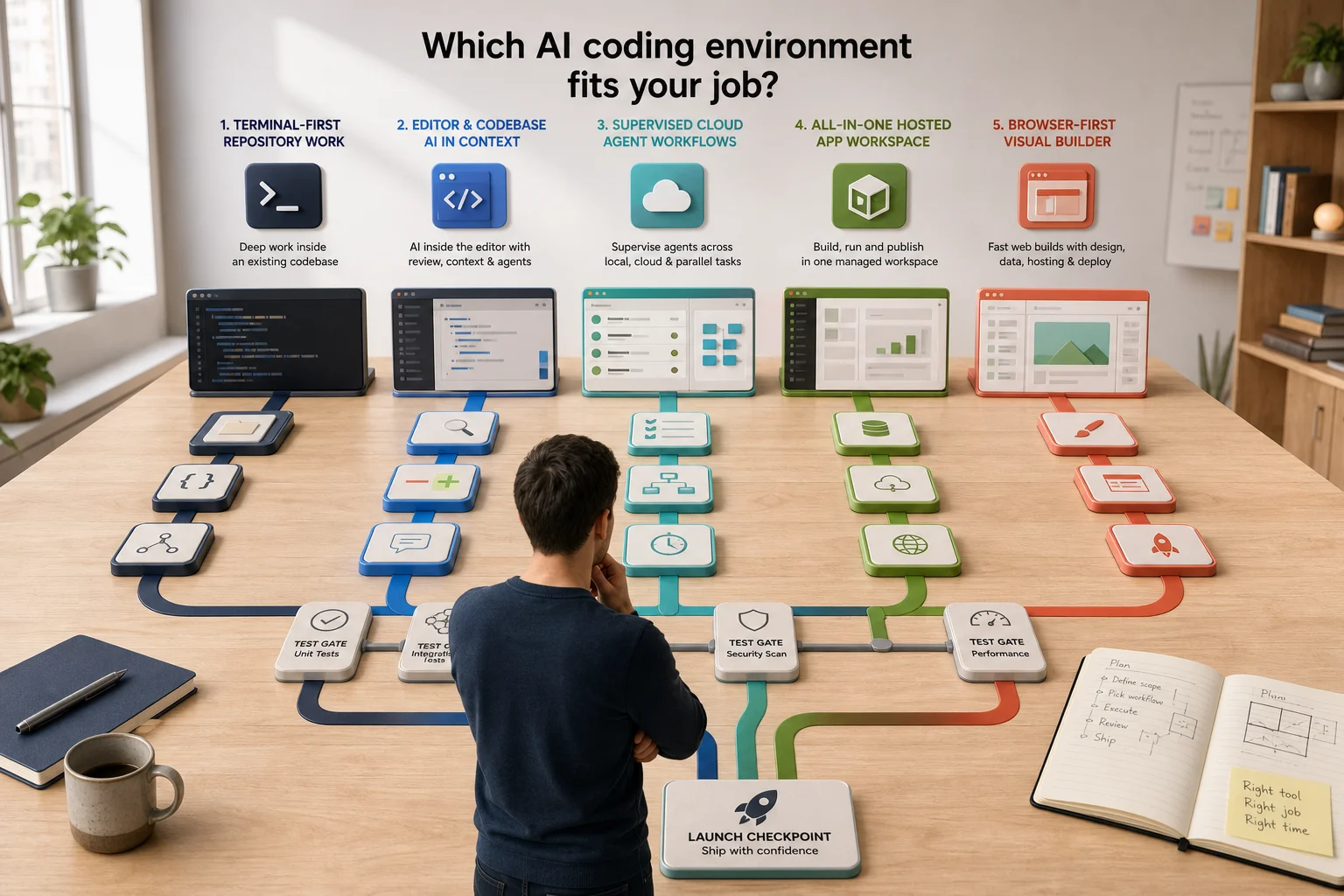
That answer is less thrilling than declaring a winner, but considerably more useful. Claude Code is built around the terminal and an existing codebase. Cursor puts an agent inside an editor and now extends it into cloud workflows. OpenAI's coding product is Codex, available across the app, CLI, IDE and cloud, rather than an ordinary ChatGPT conversation wearing a hard hat. Replit Agent and Bolt are closer to complete browser-based product workshops, combining generation with infrastructure and publishing.
The category is also moving quickly. On 19 August, Cursor added subscriptions for cloud agents so they can monitor pull requests, follow Slack threads and continue scheduled work. The fashionable unit is no longer the clever autocomplete. It is an agent with a machine, tools, permissions and enough time to become either extremely useful or an unusually diligent source of technical debt.
So which is the best AI coding tool? Here is the honest version.
The short answer: best AI coding tools by use case
- Claude Code: best for terminal-first developers who want a capable agent working deeply inside an existing repository.
- Cursor: best for developers who want AI woven into an editor, with code review, visual interaction and cloud agents close at hand.
- ChatGPT with Codex: best for supervising substantial tasks across local, cloud and parallel agent workflows, especially when the work extends beyond one editor session.
- Replit Agent: best for founders and small teams who want to describe, build, run and publish an application in one managed workspace.
- Bolt: best for fast browser-first web and JavaScript product builds where design, database, hosting and deployment should feel like one process.
None is automatically best for architecture, security, maintainability or production readiness. A tool can produce working software while quietly leaving every important decision for later. Later is a surprisingly busy department.
Claude Code: best for terminal-first repository work
Claude Code is the strongest fit when the centre of gravity is an existing repository and the person directing the work is comfortable in a terminal. Anthropic's official setup documentation positions it as a local coding agent with native installation options across major desktop platforms, while its command-line interface supports interactive work, scripted output, tool permissions, model selection and MCP connections.
That makes it well suited to debugging, refactoring, migrations, test work and tasks that need to follow the repository's real commands rather than reconstructing the project inside a chat window. It can inspect files, run tools and work with the environment a developer already trusts.
The trade-off is equally clear. Claude Code gives the agent serious access to a serious environment. Teams need repository instructions, bounded permissions, usable tests and a deliberate review process. A powerful terminal agent placed in a codebase that cannot be built locally is not transformed by optimism. It merely encounters the same confusion faster.
Choose Claude Code when: you already have a codebase, your team works comfortably with terminals and pull requests, and you want deep repository work without moving the product into a new hosted builder.
Cursor: best for an AI-native editor and always-on agents
Cursor remains the most natural choice for developers who want the coding agent to live where they read, edit and review code. Its Agent documentation describes a system that searches a codebase, edits files and runs terminal commands, with the model selectable for the task.
The cloud side now matters just as much as the editor. Cursor's official documentation says cloud agents run in isolated virtual machines with cloned repositories, dependencies, secrets, network access and the ability to test their work. The August subscriptions update goes further: agents can wake in response to events, monitor pull requests and keep moving through CI feedback.
This is attractive for teams whose work already revolves around issues, branches, reviews and continuous integration. It also increases the importance of environment design. A cloud agent needs the correct installation process, narrow secret access, representative tests and clear boundaries around what it may publish or merge.
Choose Cursor when: you want the fastest route from editor assistance to cloud delegation, your team values visual diffs and in-context review, and your repositories are prepared for automated build and test work.
ChatGPT and Codex: best for supervised parallel delivery
For coding, the relevant OpenAI product is Codex. A standard ChatGPT conversation is excellent for explaining an error, exploring an approach or drafting a small snippet. Codex is designed to work with repositories, execute commands, run tests and return changes that can be inspected.
OpenAI's Codex app announcement describes multiple agents working in parallel, each using an isolated worktree so separate tasks do not collide. It also connects the app with the CLI, IDE extension and cloud, and supports reusable skills for established workflows.
That makes Codex particularly useful when the job is larger than an editor exchange: investigate three bugs in parallel, migrate a subsystem, review a change, create documentation, run an evaluation and keep the evidence together. The management layer is the product advantage.
It is not a licence to delegate an unclear product brief to five agents and enjoy five varieties of misunderstanding. Parallel work increases throughput only when tasks, ownership and integration points are explicit.
Choose Codex when: you want to supervise longer technical tasks across local and cloud environments, run independent work in parallel and reuse team instructions or skills across projects.
Replit Agent: best for one managed route from idea to live app
Replit Agent is aimed at builders who value a complete managed environment over choosing every part of the toolchain. Replit's official Agent guide says the agent can plan, write code, explain behaviour, debug and improve an application. The same workflow includes checkpoints, allowing a builder to review changes and roll back when a promising instruction has made the product objectively worse.
For a non-technical founder, that continuity is valuable. The code, runtime, data and deployment experience are close together, so the gap between an idea and a testable application is small. It is a strong setting for prototypes, internal tools, early customer trials and products whose initial architecture fits the platform well.
The important question is what happens after the first successful build. Check how the database is structured, how authentication is enforced, how secrets are managed, how costs behave under load and how the project moves if the team later needs a different infrastructure model.
Choose Replit Agent when: speed to a working hosted application matters most, your team wants one environment for coding and operations, and you are prepared to review the product structure before customer or investor scrutiny.
Bolt: best for browser-first JavaScript product building
Bolt offers the most product-like starting point of the five. Its official introduction covers websites, web applications and mobile apps, with Bolt Cloud providing databases, hosting and domains inside the same browser-based project. It can also connect to GitHub, Stripe, Expo and other services.
This makes Bolt compelling for founders, designers, marketers and agencies that want to turn a clear product idea or interface into something people can use quickly. Its browser environment removes much of the initial setup, and direct access to code means a technical team can intervene when prompting has reached the dignified end of its usefulness.
The constraint is the shape of the platform. Bolt focuses on JavaScript-based web technologies. That is generous territory, but it is not every architecture. Teams should confirm language, infrastructure, data and integration requirements before building a business around the convenience of the first afternoon.
Choose Bolt when: you are building a web-first product, design and deployment speed matter, and an integrated JavaScript environment fits the intended production system.
What no AI coding tool decides for you
Every tool in this comparison can accelerate code production. None can take responsibility for the product.
The unresolved work includes deciding what customer problem matters, defining data ownership, designing access control, choosing failure behaviour, validating accessibility, monitoring production, testing backups, controlling deployments and documenting the system well enough for somebody else to maintain it.
This is why the best AI for coding is not necessarily the best AI for shipping. A convincing interface can conceal weak tenant isolation. A passing test suite can omit the risky journey. A one-click deployment can publish an application whose operating costs, data retention and recovery process remain politely fictional.
Before exposing an agent to production systems, use distinct identities and narrow permissions. Venturist's guide to AI agent identity security explains the controls. Before investment or acquisition, assemble evidence that the team understands and can operate what it built. The vibe coding due diligence guide sets out what reviewers will look for.
How to choose the best AI for coding in your business
Run a short pilot using one representative task, not a ceremonial to-do application that every platform can produce while half asleep.
- Choose a real change. Include existing code, a database or integration, tests and one awkward edge case.
- Define acceptance evidence. Require working behaviour, tests, security checks, deployment notes and a reversible change.
- Measure total effort. Count briefing, waiting, correction, review and recovery time, not merely the first generated output.
- Inspect ownership. Confirm the code, data, repository, environment and deployment can be controlled outside the agent conversation.
- Test a failure. Break a dependency, reject a permission, restore a checkpoint or roll back a deployment.
- Review the result independently. The agent that wrote the change should not be the only system declaring it excellent.
The winner is the tool that produces the best reviewed outcome inside your constraints. It may be two tools: a browser builder for discovery and a repository agent for hardening. It may change as the product moves from prototype to production. Tool loyalty is not architecture.
The verdict
Claude Code is the strongest terminal-first choice. Cursor is the best integrated editor and cloud-agent environment. Codex is the best fit for supervising parallel, longer-horizon technical work. Replit Agent is the clearest managed path from idea to hosted application. Bolt is the most direct browser-first route for web and JavaScript products.
The best AI coding tool is therefore conditional, which is mildly inconvenient for comparison charts and excellent for founders. Choose the environment that matches the work, then apply ordinary engineering discipline with unusual enthusiasm.
If your AI-built product works but you are unsure whether its architecture, security, database, integrations or deployment can survive real customers, show Venturist what you have built. A focused product audit can identify what to keep, what to stabilise and what must change before launch.